The ridiculous case of adding a script element
Adding a script element to a page should be a no-brainer. Yet, it's ridiculously unreliable in the wild - when you don't have any idea of the surrounding markup.
You know the drill - create a script element, point its src to a URL and add it to the page so that script file can be downloaded in a non-blocking manner.
Creating the script is nice and easy:
var js = document.createElement('script');
js.src = 'myscript.js';
The problem is how to add it to the page.
1. to the head
Probably the most common approach is to append to the head of the document:
document.getElementsByTagName('head')[0].appendChild(js);
You get all head elements (there should be only one) and you add the script there so the result is
<html>
  <head>
    <script>
    ...
But what if there's no head in the document? Remember, we want solid robust code that always works.
Well turns out that most browsers will create the head element even if the
tag is not there.Most, but not all as Steve Souders' browserscope test shows. Exceptions include browsers like Opera 8 but also Android 1.6 and one iPhone 3 - hardly old and negligible.
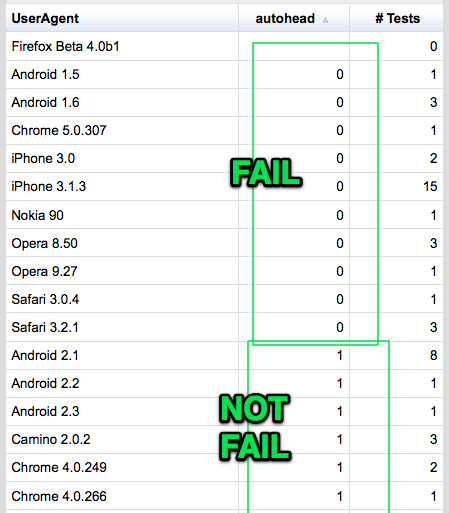
So head is out.
2. add to the body
This is even shorter:
document.body.appendChild(js);
what if there's no <body> tag? Well my test shows that all tested browsers will create a body element. Even one that has a working appendChild() method. Now, while some of those that don't create head, do create body, I'm still a little uncomfortable that I couldn't find a single browser that doesn't create body. Makes me feel a little worried about the testing and data collecting.
But even if we assume that in all browsers, document.body always exist, there's still a problem. IE7 and the dreaded "Operation aborted" error.
If you modify BODY while loading the page and from a script that is not a direct child of body, but nested in another element, you get Operation aborted and nothing works.
Surprisingly simple page fails miserably:
<html>
  <body>
      <div>
          <script>
          var js = document.createElement('script');
          js.async = true;
          js.src = "http://tools.w3clubs.com/pagr/1.sleep-2.js";
          document.body.appendChild(js);
          </script>
      </div>
  </body>
</html>
See it live in IE7 and be amazed

Now operation aborted may be solved with a defer, but maybe not in IE9.
Another reason not to attempt anything with body is if the script is included in the head. At execution time we have not reached <body> yet, so document.body doesn't exist. Demo.
3. use documentElement
document.documentElement is the html doc itself. Now that's got to exist no matter what.
So you go like
var html = document.documentElement;
html.insertBefore(js, html.firstChild);
And it works!
But what if the firstChild is a comment before the head? This makes something kinda weird:
<html>
  <script>
  <!-- comment -->
  <head>
    ..
Script obviously has no place there, but my test page worked in ie6789, and recent versions of FF, Chrome, Safari, Opera.
But looks like there are other browsers where this comment thing fails as reported(btw, good to read the whole post and all the comments) by Google Analytics folks who say they have received complaints when they used to do that. There might be other cases or browsers I didn't try. So reluctantly, we move on.
4. hook to the first script
Ahaa, if you're running a script, then this script must either be inline <script>bla</script> or external <script src="meh.js">. Either way, there's gotta be at least one script tag! Wo-hoo!
So the final solution is:
var first = document.getElementsByTagName('script')[0];
first.parentNode.insertBefore(js, first);
No matter where the first script might be, we glue out new one right above it.
Drawback is that looking for script nodes might be a little more expensive than looking for document.documentElement or document.body or the single match of getElemenetsByTagName('head')
There's still a case when there might not be a script element at all. Ah, impossible, since we're running a script there must be a script element! Well (and thanks to @kangax who pointed this to me while he was reviewing JavaScript Patterns!) here's one example:
<body onload="alert('Look ma, executing script without a script tag!')">
Overall while not completely foolproof, this is as close as you can get to being able to achieve the simple task - add a new script node. Isn't web development just magnificent?
(Funny thing if you use this only to load a script asynchronously: in order to load a script (file), you need a script that refers to a script, possibly itself. JavaScript all around.)
Once again the whole snippet:
var js = document.createElement('script');
js.src = 'myscript.js';
var first = document.getElementsByTagName('script')[0];
first.parentNode.insertBefore(js, first);